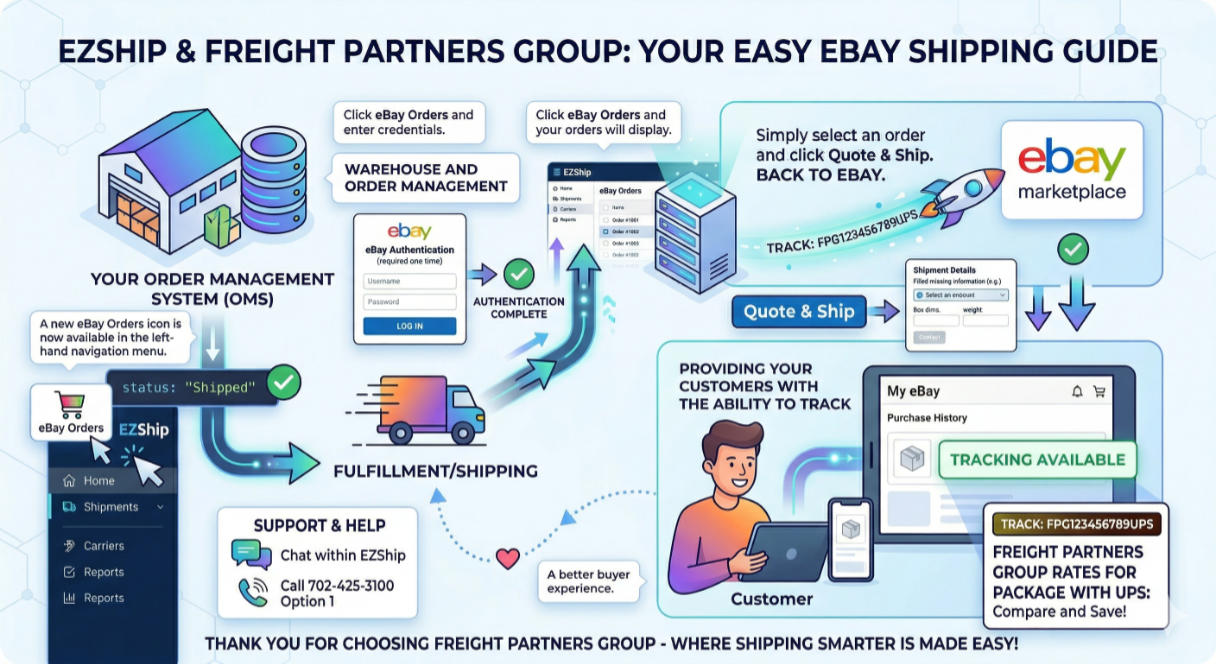

A new eBay Orders icon is now available in the left-hand navigation menu within EZShip.
Click on the eBay Orders icon and enter your eBay credentials (required one time).
Once you have completed the eBay authentication, click on the eBay Orders icon and your eBay orders will display.
Simply select an order that you wish to ship, click the Quote & Ship button and fill in any missing information to complete the shipment process.
It’s that easy! The shipment status will automatically update, and we will send the tracking number back to eBay. This will provide your customers with the ability to track their shipments from their eBay account.
If you have any questions or need help getting started, feel free to reach out to the FPG team either via Chat within the EZShip Platform or by calling 702-425-3100 Option 1.
Freight Partners Group negotiated discounted rates for small package with UPS, so if you haven’t already, be sure to compare our rates to what you are currently paying for small package.
Thank you for choosing Freight Partners Group – where shipping smarter is made easy!
eBay is a trademark of eBay Inc. This website is not affiliated with, sponsored by, or endorsed by eBay Inc.